📖 `newman` Testing CLI for postman
To use postman as an automate testing and building the report for test result.
Pre-Required
You need to run npm that required NodeJs for more information please go to NodeJs website for installing it.
Export your Collections and Environments from Postman
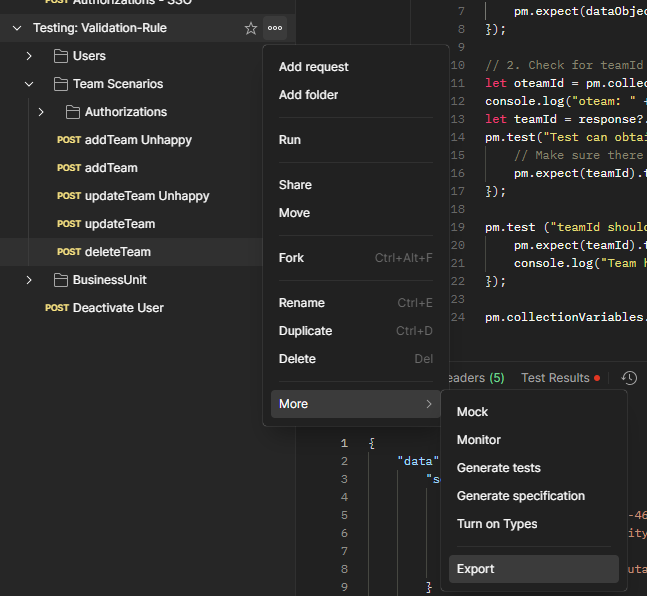
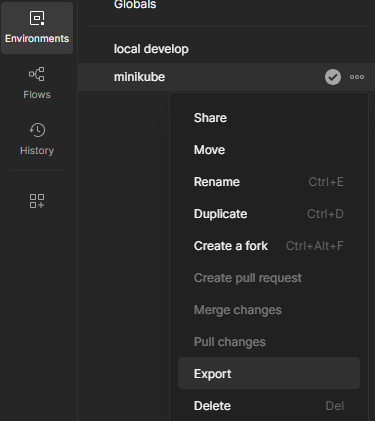
Preparing your project folder, for example D:\Works\Newman and placing exported files to working folder
Installing newman
To start working with newman we need to install by using npm, In this case will install globally becuase I use newman for vary tasks
1
npm install -g newman
Running test
First running and check your result by using your collection and environment file by running
1
2
# Run command with: newman run [collections.json] -e [environment.json]
newman run ./yourcollection.postman_collection.json -e ./yourenvironment.postman_environment.json
if your environment using self-sign certificate you can added --insecure to allow case execute.
1
newman run ./yourcollection.postman_collection.json -e ./yourenvironment.postman_environment.json --insecure
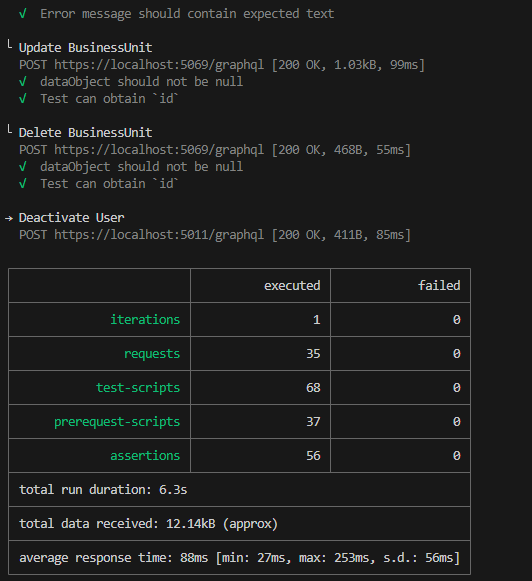
They will running and summary result to show in terminal like this
[Optional] Extra report html
[Optional] to install beautiful HTML report install additional package
1
npm install -g newman-reporter-htmlextra
added args to tell newman using new report engine
1
newman run ./yourcollection.postman_collection.json -e ./yourenvironment.postman_environment.json --insecure -r htmlextra
Report with generate to folder ./newman/newman_htmlextra_[running date time].html They are many extra report engine, please should your favourite one.