.NET Framework Version Check
.NET Framework Version Check
For current dotnet you can very simply see installed runtime and SDK by using dotnet --info, but checking the old .NET Framework is more difficult.
Quick solution
Use following command to check installed versions of .NET framework on windows system
1
gci 'HKLM:\SOFTWARE\Microsoft\NET Framework Setup\NDP' -recurse | gp -name Version,Release -EA 0 |where { $_.PSChildName -match '^(?!S)\p{L}'} | select PSChildName, Version, Release
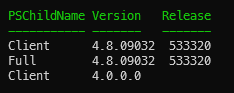
You will get result as below
This post is licensed under CC BY 4.0 by the author.